Evidence
The Evidence page is designed to simplify the complexities of evidence collection for your framework’s compliance. Its core purpose is to assist you in accessing and managing your compliance-related evidence files efficiently.
You reach it from Evidence in the left navigation.
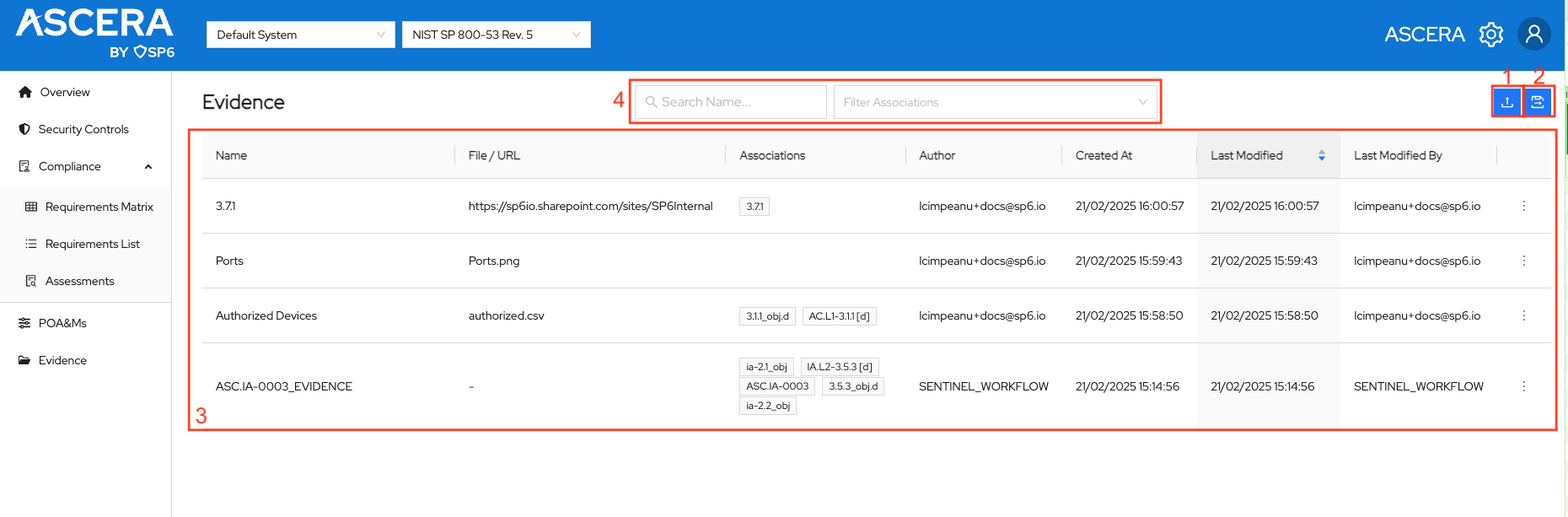
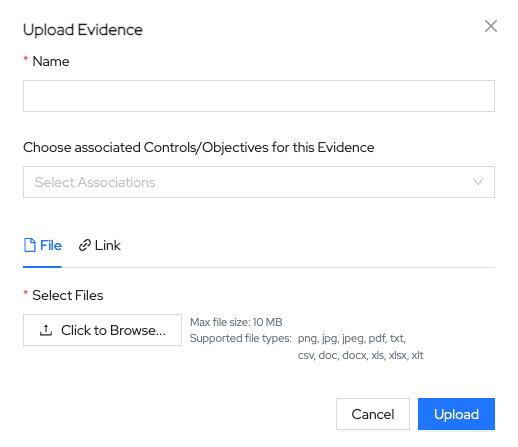
1. Upload and Associate Evidence
Clicking the upload button in the top right corner launches the modal designed to facilitate the uploading of evidence files. In the Upload view, the user can upload new evidence files and links and create associations with controls/objectives across frameworks.
2. Export Evidence
Two export options are available:
- Export Filtered Evidence - exports only the evidence currently shown in the table, so any search or filter you have applied is respected.
- Export All Evidence - exports every evidence record for the system, ignoring the current filters.
Both produce a ZIP archive, and the export process starts automatically once the button is clicked.
Evidence cannot be shared between the systems you manage in ASCERA.
3. Evidence Table
The table displays existing evidence along with corresponding Type, Name, File / URL, Associations, Author, Created, Last Modified, and Last Modified By fields. A checkbox column on the left lets you select individual rows, or use the header checkbox to select all evidence.
The Type column shows the format of the record, for example JSON for evidence captured by an automation.
Clicking the three dots at the right side of each row reveals the option buttons.
- View - clicking on this button will open the file in a separate tab if the file is an image or download it if the file is in a different format.
- Download - clicking on this button will download the file.
- Edit - clicking on this button will open the Edit Association modal, allowing users to modify associations by removing old tags and adding new ones. Clicking on Submit in the modal applies the change to the association and updates the table.
4. Filters
The page offers a selection of filters to help navigate through the evidence.
- Search - enables users to find a particular file by name.
- Filter Associations - narrows the table to evidence associated with the controls or objectives you select.