Controls Matrix
The Controls Matrix is an interactive and dynamic placemat view that provides an overview of the controls and requirements specific to your framework of choice, along with their status and other useful information. This page serves the purpose of offering users an in-depth understanding of their current compliance with the compliance framework of choice, specifically focusing on Met vs. Not Met assessments as well as the utilization of Continuous Controls Monitoring (CCM) and Automated Collection of Evidence (ACE).
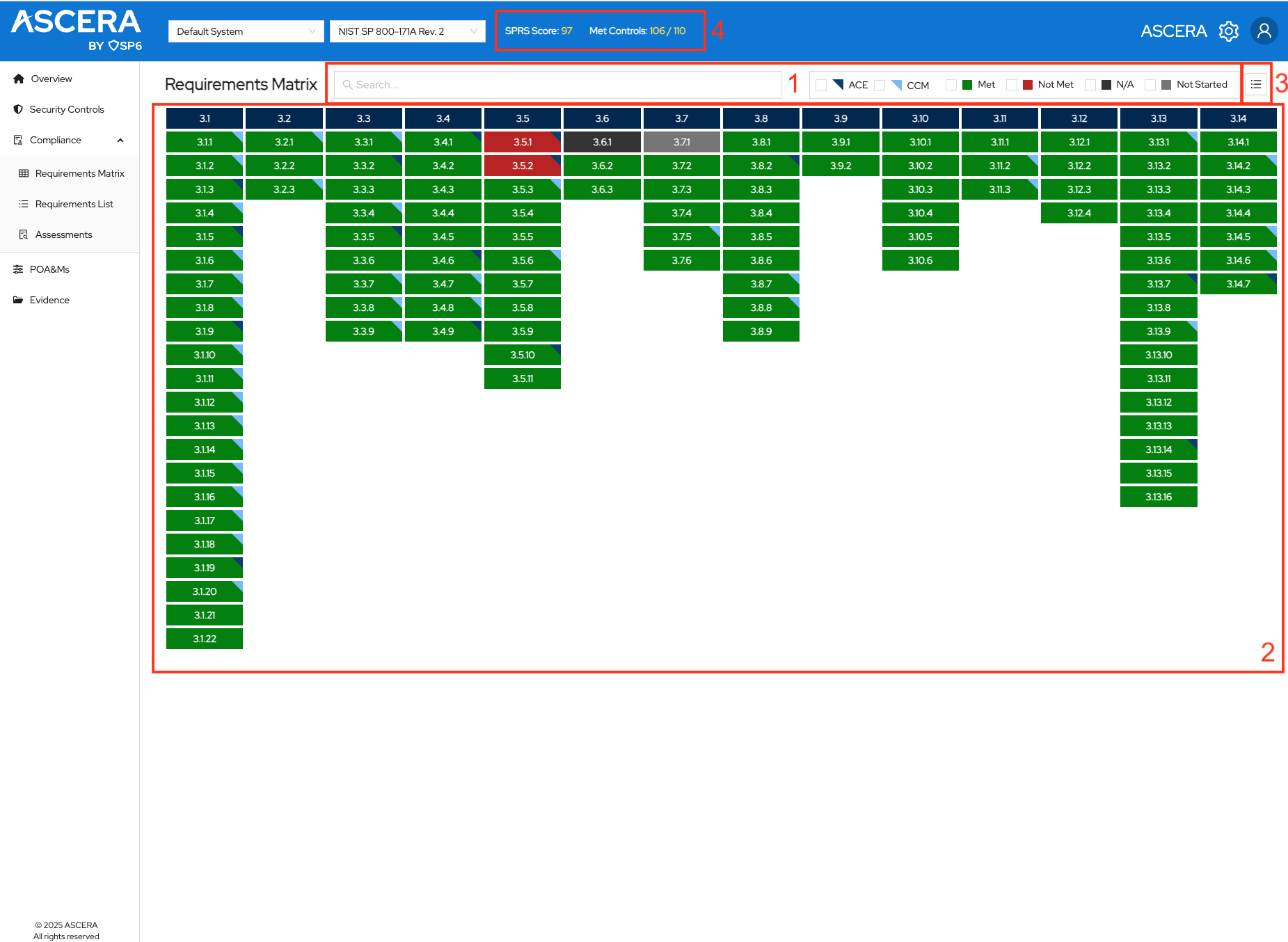
1. Filters/legend
Filters are provided as a user-friendly tool to facilitate searches across various key fields crucial for monitoring compliance. The available filters include:
- Custom Search Bar
- Weight – Filter by the DoD weight assigned to the control.
- Is POA&M-able? – Limit the view to controls that can or cannot carry a POA&M.
- ACE
- CCM
- Has POA&M
- Met
- In Progress
- Not Met
- N/A
- Not Started
An export button sits at the end of the filter row for exporting the current view.
2. Placemat view of domains and controls
This is the main section of the page. Below are outlined functionalities, notes, and actions that can be executed within this context.
Hovering over the column headers reveals the complete name of the domain.
Hovering over a control cell provides a concise list of key attributes pertaining to that control.
Clicking on a control automatically redirects users to the Control Details page for comprehensive information.
3. Toggle button
A toggle button is displayed in the top right corner. Clicking on this button alters the view to a table format, offering an alternative perspective.
4. SPRS Score and Met Controls count
When the CMMC 2.0 Level 2 or NIST SP 800-171 Rev. 2 framework is selected, the first element displayed on the Controls Matrix page is the Current SPRS Score. This numeric value represents the grade utilized by the Department of Defense (DoD) to evaluate and assess a supplier's cybersecurity posture. Additionally, the count of met controls enables users to easily track their adherence to Met controls compared to the total number of controls.