Control Detail Page
The ASCERA app is specifically designed to facilitate the comprehensive implementation and continuous monitoring of all controls required to achieve compliance with various frameworks.
The Control Details pages are meticulously designed to assist users in effectively monitoring control statuses, implementations, Plans of Action & Milestones (POA&Ms), file-based evidence, and other pertinent information crucial for obtaining CMMC certification.
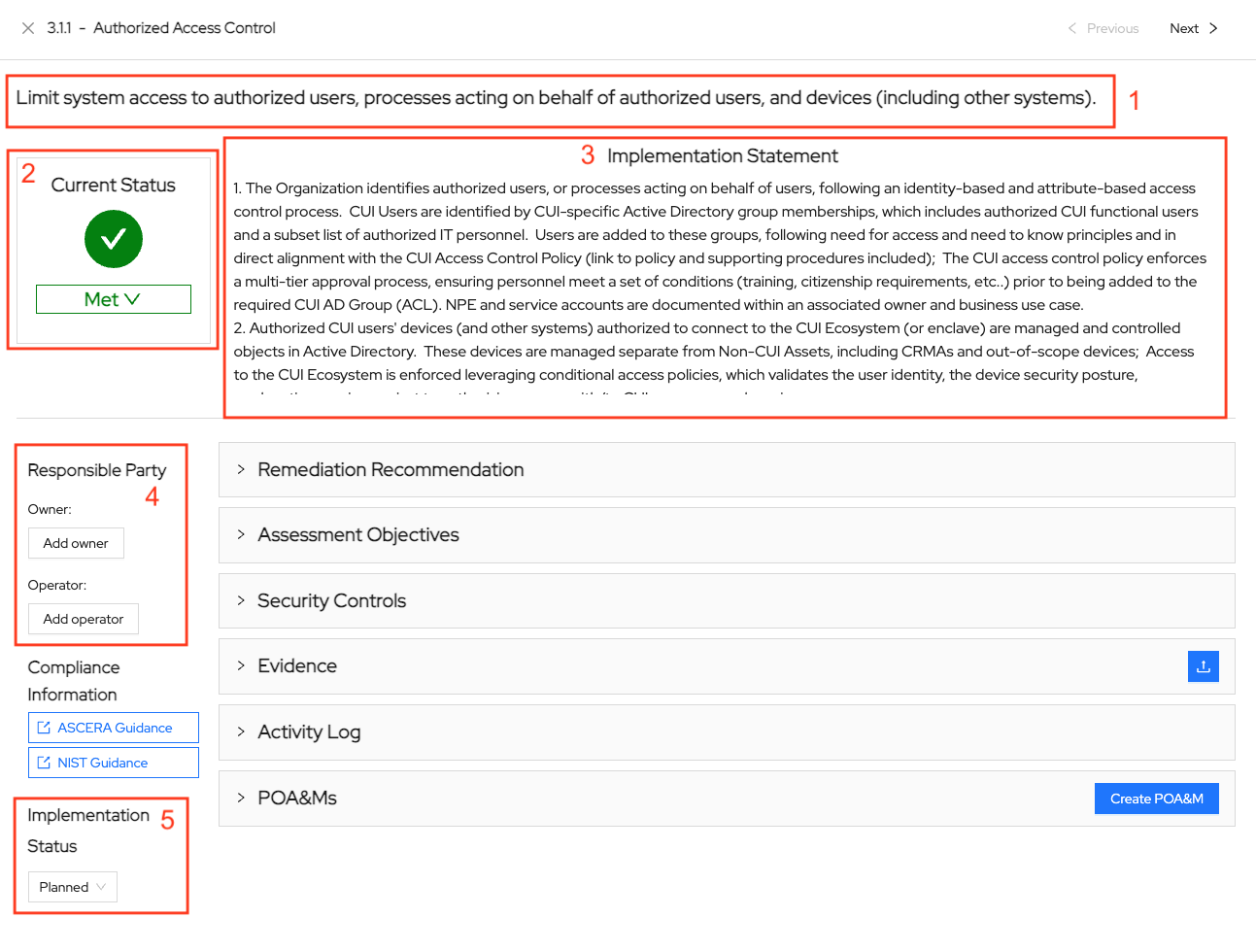
1. Control title
Each Control Details page features the Control title and description.
2. Current Status
The most crucial element is the control Current Status. The current status will reflect the current state of the ACE requirement based on the business engine compliance rules when configured for ACE. Also, Users have the capability to manually update the status, as needed, when conducting control reviews. Any modifications to control details can potentially impact the overall control status.
3. Implementation Statement
The implementation statement describes the measures taken to meet the requirements of a control. The implementation statement will seamlessly integrate into the generated System Security Plan.
4. Responsible Party
This feature helps the user establish an Owner and Operator for a control.
The Owner is the entity ultimately accountable for ensuring the control’s effectiveness and mitigating the risks it is designed to address.
The Operator is the entity responsible for the day-to-day operation of the security requirement.
5. Implementation Status
This feature provides five implementation status options including planned, implemented, partial, alternative, and not applicable.
6. Inheritance
When a system is linked to a parent, inheritance checkboxes appear at both the control and the objective level on this page. Checking a box pulls the status, and the implementation statement at the control level, from the parent system, and the inherited value becomes read-only. See System Inheritance for how the parent and child relationship is configured.
Control Detail Page Dropdowns
Discussion
Users can view the discussion dropdown for a comprehensive overview of the NIST 800-53 control.
Description
The description dropdown provides the official NIST 800-53 framework’s verbiage and notation of the control’s details that need to be met for compliance.
Assessment Objectives
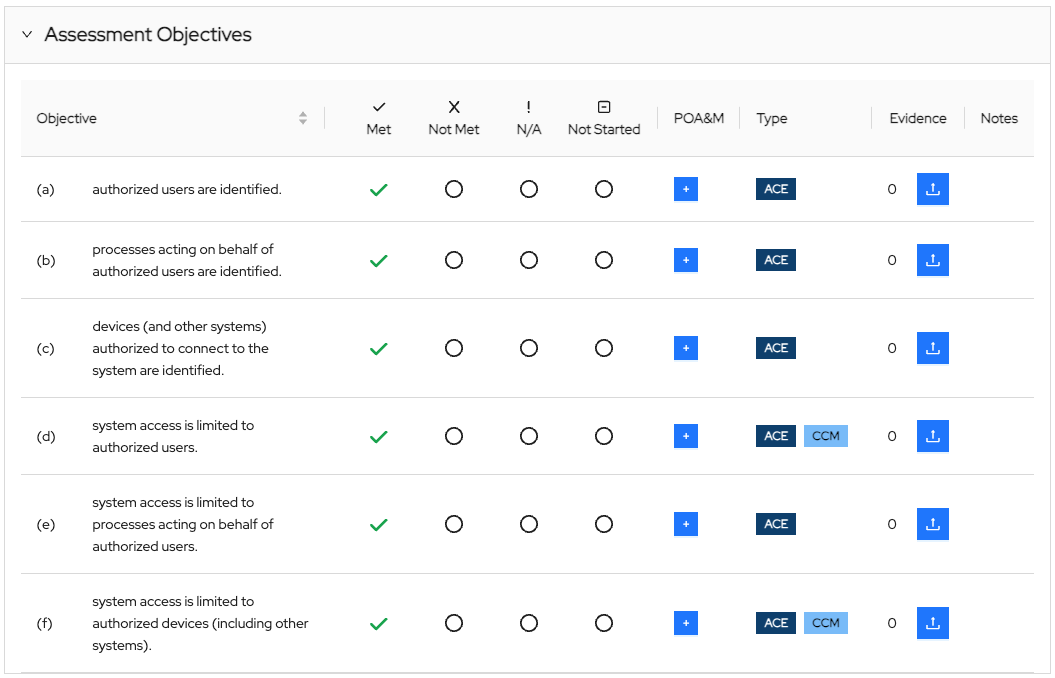
Within the assessment objectives dropdown, a list of all objectives essential for satisfying the control's requirements is presented. This section also provides the following details for each objective:
- Objective Status - Each objective can have a different status. Once all objectives are satisfactorily met, the overall control’s status updates to reflect the met status.
- POA&M - Each objective can be associated with one or more POA&Ms. The purpose of a Plan of Action and Milestones is to outline how a contractor plans to address and rectify any known weaknesses.
- Automation - Not necessarily all objectives have the capability of automatic evidence collection or Continuous Control Monitoring. The objectives that have these automation capabilities are marked in this area with the applicable tag and the objectives that are not automated are considered “administrative controls” and are marked with the “ADMIN” tag.
- Evidence - This subsection facilitates the monitoring of evidence files uploaded for each objective, along with identifying objectives that necessitate further attention. Users are empowered to upload evidence files specifically for a given objective.
- Create Objective Notes - This column is dedicated to managing notes for each objective within the control. Users are encouraged to frequently review and update notes to ensure they remain relevant and accurate and to provide comprehensive details in each note to enhance clarity and usefulness.
Automations
A control can be associated with multiple automations. This dropdown provides an overview of each automation, along with identifying, viewing, and sorting evidence with fields for:
- Names
- Status
- Objectives
- Description
Evidence
This dropdown facilitates the monitoring of evidence files uploaded for the control, along with identifying, viewing, and sorting evidence with fields for:
- Name
- File/URL
- Associations
- Author
- Created At (Time)
- Last Modified
- Last Modified By
Users are empowered to upload evidence files specifically for a given control or objective.
Activity Log
The Activity Log dropdown provides a real-time view of any activity performed in the control or associated with the control. Entries can be identified, sorted, and viewed with fields for:
- Description
- Event Type
- Context
- Author
- Source
- Created At (Time)
POA&Ms
The purpose of a Plan of Action and Milestones is to outline how a contractor plans to address and rectify any known weaknesses.
Each control can be associated with one or more POA&Ms. This dropdown offers an overview of all POA&Ms associated with this specific control by identifying, viewing, and sorting with fields for:
- ID
- Title
- Controls/Objectives
- Status
- Date Created
- Due Date
- Last Updated
- Responsible Party
Users can create additional POA&Ms by clicking the “Create POA&M” button.